 SOC Anywhere
Most security tooling is oriented around real-time response. Alerts come in, incidents get created, analysts investigate and close them. That reactive flow is appropriate — incidents need timely attention. But there is a different kind of visibility that tends to get less attention: the ability to look back over a period, filtered to what matters, and understand what actually happened.
The Microsoft Defender security portal gives you an incident queue and a set of filters you can apply manually. You can export some data to CSV. What it does not provide is a way to define a specific set of criteria and have a structured report generated and delivered automatically on a recurring basis. If you want a regular summary of, say, all High and Medium severity incidents closed as true positives last month, you are doing that manually each time — exporting, filtering, reformatting, and mailing it.
For teams that run monthly security reviews, report to management, or have internal or external audit obligations, this tends to become a recurring manual task that quietly eats up time.
Building a search query
In SOC Anywhere, the incident list has a query builder that lets you filter across multiple dimensions at once. Severity, status, classification, determination, date range, assigned user — you can combine these in whatever way makes sense for what you are looking for. The most common patterns are straightforward to assemble without needing to know a query language.
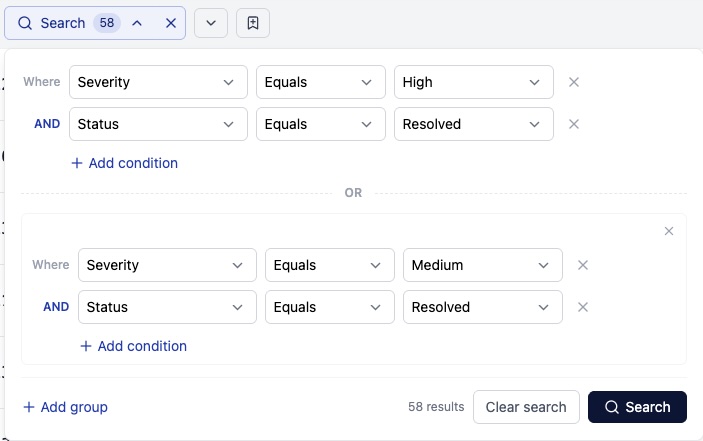
The results update as you add or change filters, so you can see immediately whether a particular combination is giving you what you expected. If the filter is pulling in incidents that should not be there, or missing ones that should, you can adjust and check again before committing to anything.
A few typical examples:
- "All High-severity incidents from the past 30 days regardless of status" — useful for a monthly threat landscape review
- "All incidents closed as true positive in the last quarter" — useful for demonstrating detection outcomes
- "All open incidents assigned to a specific team member" — useful for handoffs and workload reviews
- "All incidents classified as Malware or Ransomware in the past 90 days" — useful for tracking specific threat category trends
The query itself is just a filter. Its value increases when you want to run the same filter again.
Saving the search
Once you have the filter set up the way you want it, you can save it with a name. Saved searches persist across sessions and are shared within the team, so anyone can pick up and use the same filter without needing to reconstruct it.
SOC Anywhere supports two types of saved searches. Shared saved searches are visible to everyone in your workspace and are intended for team-wide use — common views like "all open high-severity incidents" or "true positives from the last 30 days" that multiple people might want to run or schedule. Personal saved searches are only visible to the person who created them and are useful for individual workflows, in-progress investigations, or views that are not yet ready to share more widely. Both types behave identically when used as the basis for a scheduled report.
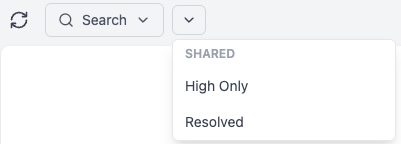
This is a small thing, but in practice it removes a recurring friction point. Teams often settle on a handful of filters they use week to week — for inboxing, for reviews, for handoffs — and rebuilding those from scratch each time is just unnecessary work. Saved searches also reduce the risk of slight inconsistencies between runs. If you're comparing last month's numbers to the month before, it helps to know the exact same filters were applied both times.
The naming and organization of saved searches naturally reflects how your team works. The ones used most frequently surface the operational patterns that are worth being deliberate about.
Scheduling a report
Each saved search can be used as the basis for a scheduled report. When the report runs, it executes the saved query against your current incident data and generates a structured PDF. The output includes a title page with the report name, environment, and generation time, followed by individual incident cards — one per matching incident.
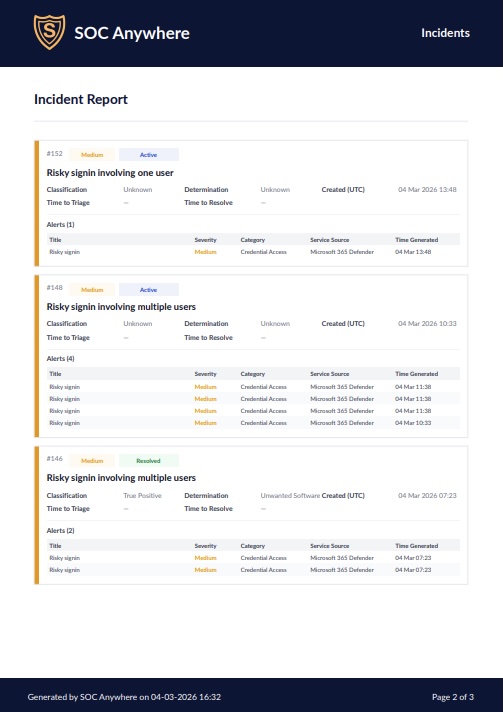
Each incident card contains the relevant metadata: severity, status, classification, determination, triage and resolution dates, and the alerts associated with the incident. The format is structured and consistent, which makes it easier to skim quickly or pass along without further formatting work.
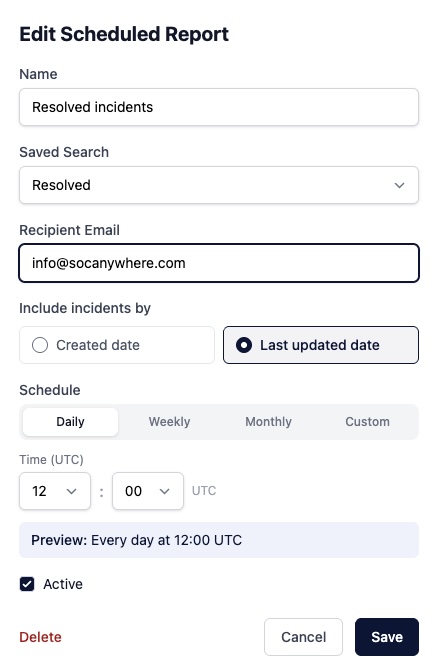
Reports can be scheduled to generate and arrive by email at whatever cadence fits your review cycle: weekly, fortnightly, monthly. Once the schedule is in place, the report shows up in your inbox at the expected time. There is no manual step involved. If the query returns no matching incidents for a period, you still get confirmation of that, which is its own useful data point. Reports can also be run on demand at any time — useful when you need a snapshot outside the regular schedule, or when preparing for an unplanned review.
Queries and report generation run quickly even for organizations that have accumulated a substantial incident history, so there is no meaningful wait even if you are running across a long date range.
How this fits into compliance and incident reporting
A number of security and compliance frameworks include requirements around incident documentation and reporting. SOC 2, ISO 27001, NIS2, and various cyber insurance policies all touch on the need to demonstrate that incidents are logged, reviewed, and handled in a structured way. The specifics vary, and what counts as adequate documentation depends on the framework and your particular situation.
Scheduled reports provide a consistent, system-generated record of incidents and their outcomes over time. A monthly report showing all incidents from the period, with their classifications and determinations, is a reasonable artifact for internal security reviews, periodic governance checks, or to hand to an auditor asking "show me your incident log for Q3."
The more practical argument is about effort. Smaller teams in particular tend to find that compliance documentation falls behind operational work because producing it takes manual effort that nobody has time for on top of everything else. If a structured report of your incident data can be generated automatically and archived, that is one less thing that requires dedicated time to produce. The report comes from operational data that already exists rather than from a separate documentation exercise.
It is worth being realistic about the limits here. A report generated from SOC Anywhere reflects what was recorded in the platform. The quality of that record depends on how consistently incidents are triaged and closed with accurate classifications and determinations. Scheduled reports help surface what is in the data; they do not compensate for gaps in the underlying incident handling process.
Fitting into recurring workflows
Most teams already have a rhythm of periodic reviews, even if it is informal. Weekly calls where open incidents get discussed. Monthly summaries for the IT manager or CISO. Quarterly reports for the board or a compliance review. The missing piece is often just getting the underlying data into a usable form without it taking 45 minutes to assemble.
Saved searches and scheduled reports are not a new workflow. They are a way to remove the manual steps from a workflow most teams are already doing, or trying to do. The query defines what you care about. The saved search means you do not have to redefine it every time. The scheduled report means you do not have to think about running it.
For teams that have already been working with SOC Anywhere's incident queue, the starting point is identifying the filters you find yourself applying repeatedly and saving those first. From there, decide which of them are worth setting up as scheduled reports. Not every saved search needs a report, but the ones you use for recurring reviews usually do.
Conclusion
Microsoft Defender for Endpoint is a capable detection platform. It excels at deep investigation work — the tooling for drilling into alerts, evidence, and timelines is genuinely strong. Where it falls short is in fast triage and recurring reporting: defining a set of criteria, running them automatically, and delivering a structured document to your inbox on a predictable basis. That gap tends to be filled with manual effort, which means it often does not get filled at all.
Saved searches and scheduled reports in SOC Anywhere are a straightforward answer to that specific gap. They are not a major workflow change. They are a way to make the reporting work that has to happen anyway require less active attention to carry out. For teams with incident reporting obligations — whether internal or external — that matters more than it might initially sound.
About the Author: we're building SOC Anywhere, a mobile-first security operations platform designed for teams without 24/7 SOCs. We've spent years working with Microsoft security tools and helping SMEs improve their security posture without enterprise budgets.
Automated Reports from Your Defender Incidents
SOC Anywhere lets you build saved search queries and schedule recurring PDF reports from your Microsoft Defender incident data. No manual exports, no formatting work.
Try it for free — no credit card needed