 SOC Anywhere
In our previous post about incident response playbooks, we covered how to standardize the "what should we do" part of incident response. This post tackles the other half of the equation: "what do we already know about this?"
Every Defender incident contains evidence. Devices, users, IP addresses, file hashes, URLs, processes. Some of these are familiar to your team. You might know that a specific device belongs to a developer who regularly triggers false positives with their build tools. Or that a particular IP address was investigated thoroughly last month and turned out to be a legitimate CDN. Or that a certain executable was already approved by your security lead after a previous escalation.
The problem is that this knowledge typically lives in someone's head. And when the next incident involving that same device or IP address appears three weeks later, the investigation starts from scratch because nobody documented what was found the first time.
What institutional knowledge looks like in practice
Think about how your team handles a Defender alert today. An analyst opens the incident, sees a list of evidence items, and starts investigating. For each piece of evidence they ask themselves: have I seen this before? Is this normal? Do I know anything about this device or user?
If the analyst has been on the team for a while, they might recognize some items. "Oh, that's the marketing laptop that always trips this alert" or "that IP belongs to our monitoring service." But if they are new, or if it is a device they have never encountered, they start investigating from zero.
This is where the gap appears. Experienced team members carry valuable context, but that context is not accessible to anyone else. When they are on holiday, in a meeting, or leave the company, it goes with them.
Dedicated SOC teams in larger organizations often solve this with SIEM enrichment rules, threat intelligence platforms, or internal ticketing systems where historical investigations are searchable. Those are solid approaches if you have the resources to maintain them. Most smaller teams do not.
The evidence knowledge base
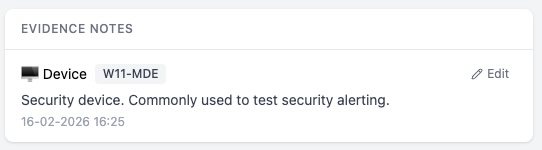
The evidence knowledge base in SOC Anywhere takes a more direct approach. It lets analysts attach notes to individual pieces of evidence. When that same evidence appears in a future incident, the note surfaces automatically. No separate lookup, no searching through old tickets.
It works at the evidence level, not the incident level. This is an important distinction. Incidents are transient. The same device, user, or IP address can appear across dozens of incidents over time. Knowledge about the evidence itself tends to be more durable and more widely applicable than knowledge about a single incident.
How it works
When reviewing an incident, every piece of evidence has a knowledge base button. Clicking it opens a focused editor where you can write a note about that specific item. The note is saved against a specific property of the evidence: for a device, that might be its hostname; for a file, its SHA256 hash; for a user, their UPN.
The next time any incident involves that same evidence, the note appears automatically in the incident's knowledge base tab, alongside any matching playbooks. No manual lookup required.
The types of evidence you can annotate cover the full range of what Defender reports:
- Devices — identified by hostname, DNS name, or Defender device ID
- Users — identified by UPN, Azure AD user ID, or display name
- IP addresses — identified by address
- URLs — identified by URL
- Files — identified by SHA256 hash or filename
- Processes — identified by filename or SHA256 hash
- Azure resources — identified by resource ID
What to put in a note
The value of the knowledge base depends entirely on what people write. A note that says "checked" is not useful to anyone. A note that says "Known development server, runs automated builds that trigger this alert weekly. Owner: Jan (DevOps). No action needed unless alert severity is High or above. Last verified: Feb 2026." gives the next analyst everything they need.
Some useful patterns we have seen teams adopt:
- False positive context — Documenting why a device, user, or process regularly triggers specific alerts, so the next person can quickly identify and close false positives.
- Ownership information — Noting who owns a device, who manages a service, or who is responsible for a particular system. This speeds up escalation when needed.
- Investigation outcomes — Summarizing what was found during a previous investigation of the same evidence. Was it malicious? Benign? What steps were taken?
- Exceptions and approvals — Recording that a specific file or process was approved by the security team after review, including who approved it and when.
A central overview
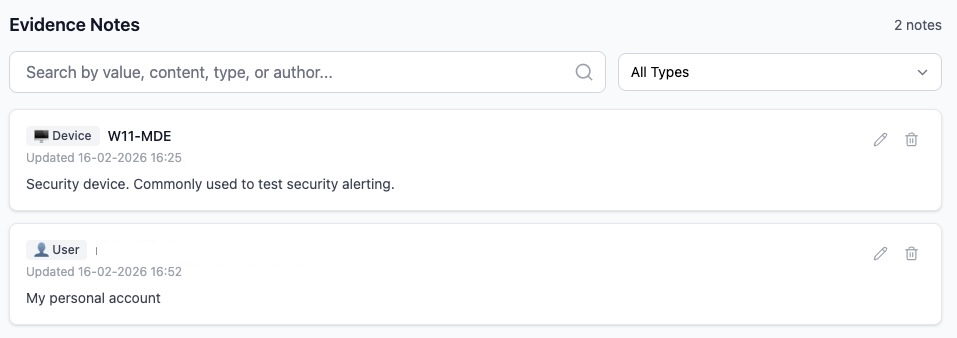
Beyond the per-incident view, a dedicated evidence notes page lets you browse, search, and manage all notes across your environment. Filter by evidence type, search by content or value, and edit or remove notes that are no longer relevant.
This central view is useful for periodic reviews. Every few months, it is worth scanning through your evidence notes to remove outdated entries, update notes about devices that have been reassigned, or flag knowledge gaps about frequently seen evidence.
How playbooks and evidence notes work together
Playbooks and evidence notes serve complementary purposes. A playbook tells you how to handle a type of alert. Evidence notes tell you what you already know about the specific items involved. Together, they provide the two things an analyst needs during triage: procedure and context.
When an incident comes in, the knowledge base tab shows both. Matching playbooks appear first, giving the analyst the response procedure. Below that, any evidence notes for the devices, users, files, or IPs involved in the incident provide the environmental context.
In practice this means an analyst opening an incident sees something like: "Here's how to handle this type of alert (playbook), and by the way, we have seen this device before, it's a known developer machine that triggers false positives (evidence note)." That combination can turn a 30-minute investigation into a 2-minute triage decision.
Building the habit
The main challenge with any knowledge management system is getting people to actually use it. The evidence knowledge base is designed to minimize friction: the editor is right there on each evidence item, notes support Markdown for formatting, and the whole interaction takes less than a minute.
That said, building the habit takes deliberate effort. Some approaches that help:
- Start with false positives — The first time you identify a false positive, add a note explaining why. This is the lowest-hanging fruit because it directly saves time the next time the same evidence appears.
- Document as you investigate — When you finish investigating a piece of evidence and reach a conclusion, take 30 seconds to write it down. The context is fresh and it takes almost no effort.
The value compounds over time. A team that has been annotating evidence for three months will triage noticeably faster than one that has not, simply because they spend less time rediscovering things they already know.
Conclusion
Security teams accumulate knowledge with every incident they investigate. The question is whether that knowledge is captured somewhere accessible or whether it disappears when the browser tab closes.
The evidence knowledge base in SOC Anywhere provides a place to capture that knowledge right where it is generated, and surfaces it automatically the next time it is relevant. Combined with playbooks for standardized response procedures, it gives smaller teams the tools to build institutional knowledge without the overhead of enterprise knowledge management platforms.
Start small. Annotate the evidence you recognize. Document the false positives. The knowledge base will grow naturally from there.
About the Author: we're building SOC Anywhere, a mobile-first security operations platform designed for teams without 24/7 SOCs. We've spent years working with Microsoft security tools and helping SMEs improve their security posture without enterprise budgets.
Build Your Team's Security Knowledge
SOC Anywhere gives your team a shared knowledge base, playbooks, and mobile-optimized incident triage for Microsoft Defender for Endpoint. No enterprise SOC required.
Try it for free — no credit card needed