Stop Missing Critical Security Incidents

Get instant alerts when Microsoft Defender for Endpoint detects threats. Triage incidents in seconds with AI-powered insights, respond from your phone, and keep your organization secure — without being chained to your desk.
30-day free trial
Secure Microsoft integration
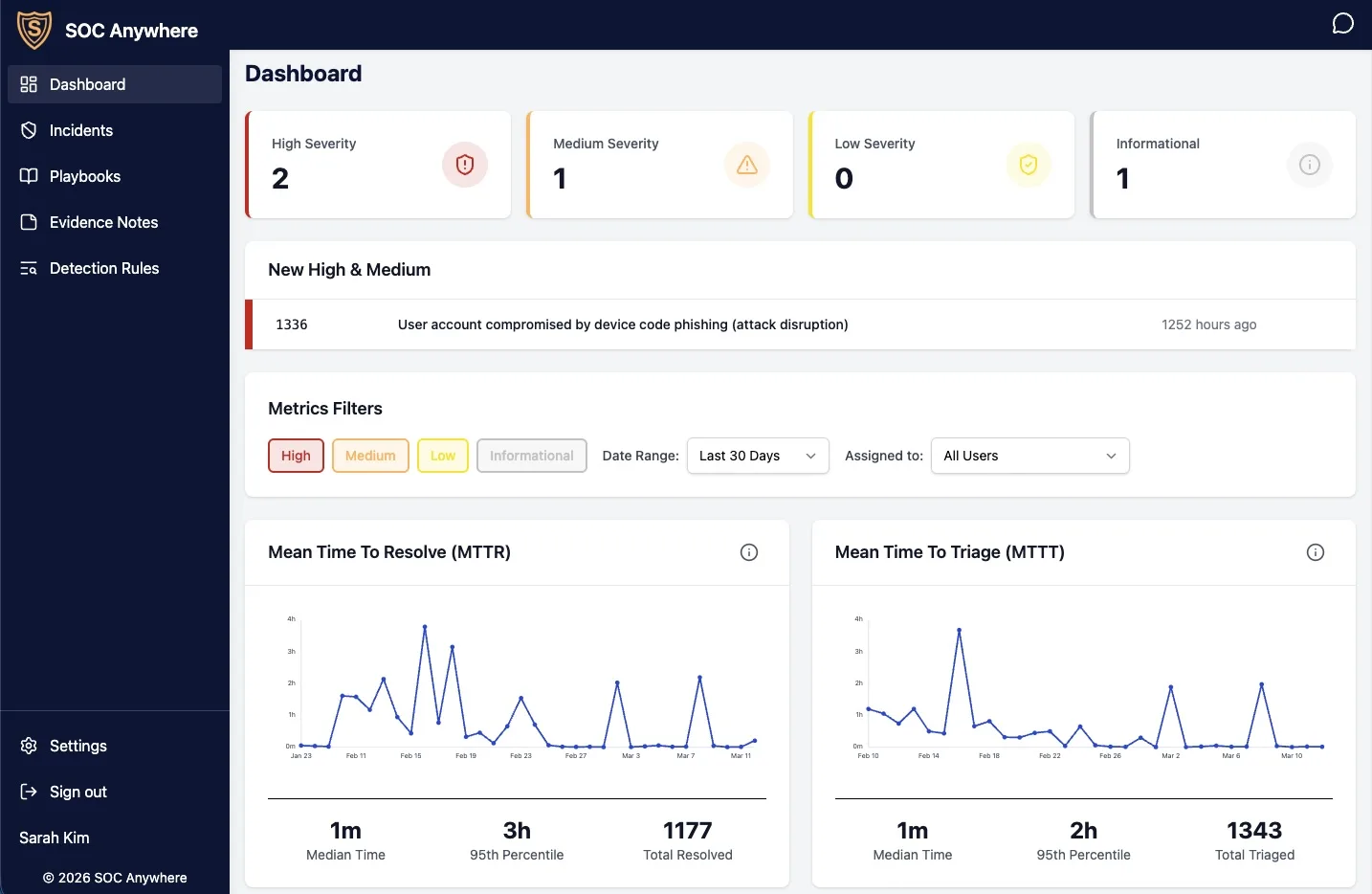
SOC Anywhere dashboard on desktop SOC Anywhere dashboard on mobile

Built for Microsoft Defender for Endpoint.

SOC Anywhere ensures you are on top of your Defender for Endpoint security incidents.

Never miss a critical incident

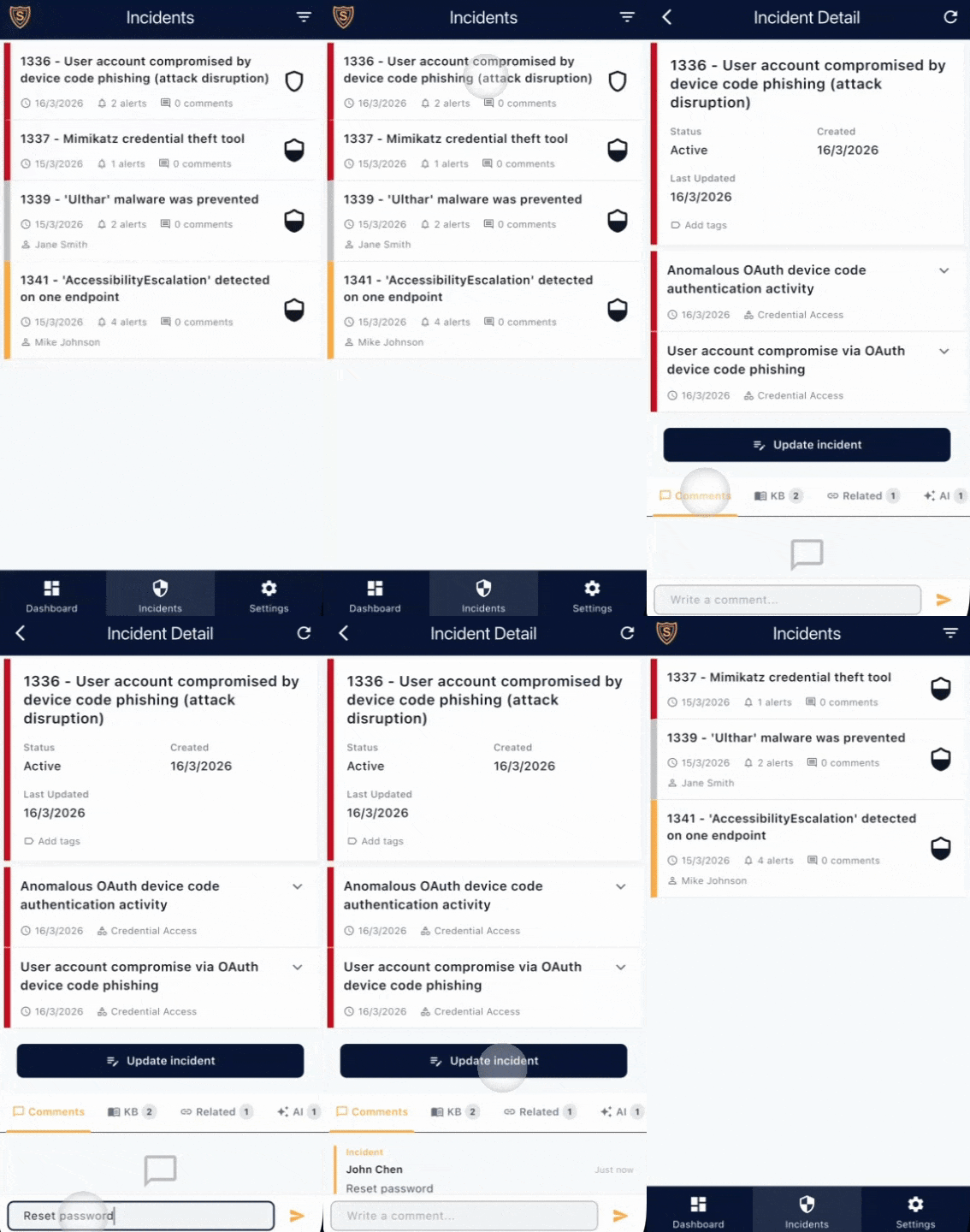
Stay ahead of threats with instant notifications the moment Defender for Endpoint detects an incident. No more constantly checking dashboards — we bring critical alerts directly to you.

  • Real-time push notifications to your phone and desktop
  • Customizable alert thresholds and severity filters
  • Focus on what matters, respond when it counts
Real-time notification dashboard

Triage incidents in seconds, not hours

Cut through the noise with intelligent incident grouping and contextual information. See the full picture instantly with related incidents, contextual knowledgebase articles, and standardized playbooks that guide your response.

  • Automatically discover related incidents and attack patterns
  • Access contextual knowledgebase articles relevant to each incident
  • Follow incident-specific playbooks for standardized response
  • Easily open the incident in the Microsoft Security Portal for further investigation
  • Close false positives immediately or escalate for investigation
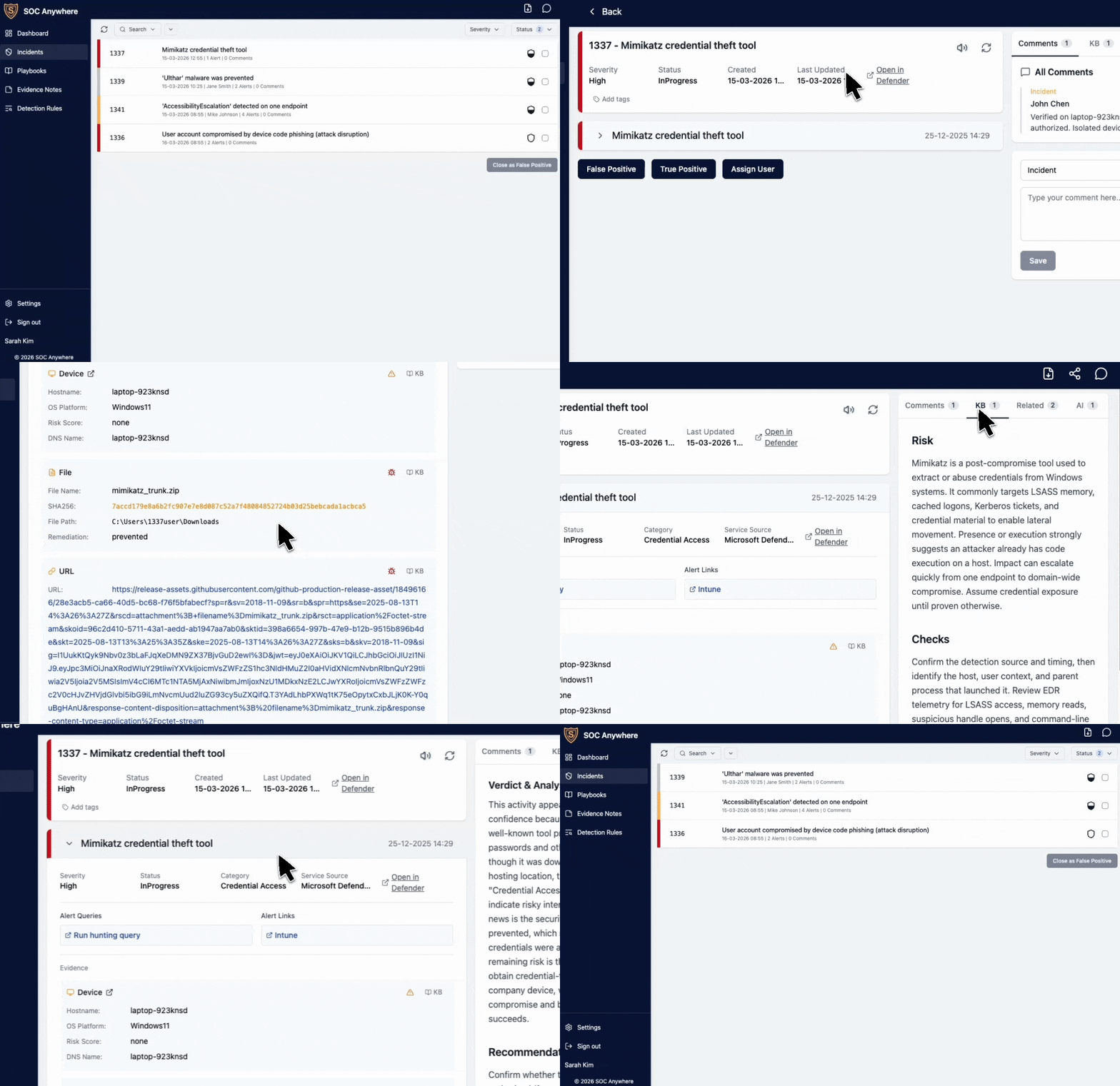
Closing a resolved incident in SOC Anywhere

Work faster with streamlined workflows

Navigate security incidents with lightning speed using clean dashboards, customizable shortcuts, and mobile-optimized interfaces designed for maximum efficiency.

  • App optimized for performance and speed
  • Custom shortcuts to advanced hunting and investigation tools
  • Respond from anywhere with full mobile support
  • Seamless integration with Microsoft Defender portal
Streamlined incident dashboard

Collaborate seamlessly with your team

Keep everyone on the same page with real-time collaboration tools. Add comments, share insights, and track investigation progress without leaving the platform.

  • Add comments and notes directly to incidents
  • Easily assign incidents to members of your team
  • Share context and decisions across your security team
  • Comments are saved in the Microsoft Security Portal

Stay responsive on the go

Access your security operations from anywhere with our mobile-optimized interface. Review incidents, check alerts, and take action — all from your phone. Whether you're on-call, commuting, or away from your desk, you'll always have full visibility into what's happening across your environment.


SOC Anywhere mobile app in action

Trusted by Security Teams

Join security professionals who are already improving their incident response

* Customer testimonials below feature AI personas. Real humans love us too, but they're too busy handling incidents to write reviews.

2000+
Incidents Every Month
5 min
Median Triage Time
24/7
Incident Monitoring
"SOC Anywhere has transformed how we handle Defender incidents. I can now respond to critical alerts while commuting, away from the office, or on the couch at home without opening my laptop. The context SOC Anywhere provides saves us hours every week."
MJ
Michael Johnson
Security Operations Manager
"As an SME, we couldn't afford a 24/7 SOC. SOC Anywhere gives us enterprise-grade incident response without the enterprise price tag. The mobile notifications mean we never miss critical threats."
SK
Sarah Kim
IT Director, Tech Startup
"The performance difference is night and day. Instead of logging into the Defender portal and clicking through multiple screens, SOC Anywhere gives me all the contextual information I need instantly. Fast triage with everything in one place has cut our incident response time in half."
DR
David Rodriguez
Security Analyst

Built for Real-World Defender Use Cases

SOC Anywhere solves the challenges security teams face with Microsoft Defender for Endpoint

Defender Notifications →

Get real-time alerts when Defender for Endpoint incidents occur. Never miss a critical security event.

Mobile SOC →

Triage Defender incidents from your phone. Security operations that work anywhere, on any device.

SOC for SMEs →

Security monitoring without a 24/7 SOC. Enterprise-grade incident response on an SME budget.

Simple, transparent pricing

  • No setup fees
  • No minimum contract
  • No per-device charges
  • Cancel anytime
Founder Solo
€5
per month
  • 1 user
  • €3 per additional user
  • Founder price lock while subscription stays active
  • Real-time notifications
  • Incident management
  • AI integration
  • Mobile access
  • Email and in-app chat support
Start a 30-day free trial — no credit card required
Founder Plus
€29
per month
  • Up to 10 users
  • €2 per additional user
  • Founder price lock while subscription stays active
  • Real-time notifications
  • Incident management
  • AI integration
  • Mobile access
  • Email and in-app chat support
Start a 30-day free trial — no credit card required

Frequently Asked Questions

Questions before connecting Microsoft Defender? Here are the key details about what SOC Anywhere does, what it does not do, how it connects, and how your team stays in control.

Product & Fit

SOC Anywhere helps small IT and security teams manage Microsoft Defender for Endpoint incidents faster. It sends real-time push notifications, gives you a mobile-friendly incident queue, shows alerts and evidence, supports comments, assignments, playbooks, AI summaries, and writes supported triage updates back to Microsoft Defender.
SOC Anywhere is built for SMEs, lean IT teams, and security teams that use Microsoft Defender for Endpoint but do not have a dedicated 24/7 SOC. It is especially useful when security is only part of someone's job and incidents need to be triaged quickly from a phone.
No. SOC Anywhere complements Microsoft Defender for Endpoint. Defender remains your detection and investigation platform. SOC Anywhere gives your team a faster way to notice, triage, assign, comment on, and classify incidents — especially from mobile. Deep hunting and advanced investigation still happen in the Microsoft Defender portal.
No. SOC Anywhere is software, not a managed security service. We do not monitor your incidents for you, investigate alerts on your behalf, or provide 24/7 analyst coverage. Your own team remains responsible for response. SOC Anywhere helps that team respond faster and stay coordinated.

Microsoft Defender Integration

SOC Anywhere is tested with Microsoft Defender for Endpoint Plan 2. We also expect it to work with Defender for Business, but customers should validate this during the free trial. You need a Microsoft tenant with Defender incidents available through Microsoft Graph Security APIs.
SOC Anywhere connects through Microsoft Graph Security APIs using Microsoft authentication. It needs permission to read Defender incidents, alerts, evidence, and comments, and to write supported triage updates such as comments, status, classification, assignment, and tags back to Defender. Admin consent may be required depending on your tenant policies.
Yes. Comments posted in SOC Anywhere sync back to the Microsoft Defender portal, so colleagues working directly in Defender can see the same investigation notes. Supported status, classification, assignment, and tag updates can also be written back to Defender.
SOC Anywhere continuously syncs with Microsoft Defender and sends push notifications when incidents are created or updated. In normal use, notifications are designed to arrive in less than a minute.

Mobile Triage & Workflow

Yes. SOC Anywhere is built mobile-first and works through native iOS and Android apps as well as a progressive web app. You can review incidents, alerts, evidence, related incidents, playbooks, comments, assignments, status, classification, and tags from your phone.
You can view the incident queue, open incident details, review alerts and evidence, read AI summaries, follow matching playbooks, check related incidents, add comments, assign incidents, update status, set classification and determination, and use custom action buttons configured by your admin.
Yes. Each user can configure notification preferences such as severity thresholds, quiet hours, and muted incident names. This helps reduce alert fatigue while keeping important incidents visible.
Playbooks are step-by-step response guides linked to specific Defender alert types. When an incident contains a matching alert, the relevant playbook appears automatically in the incident view so the responder knows what to check, how to classify the incident, and when to escalate.
SOC Anywhere can generate AI-assisted incident summaries, including an initial assessment, key findings, and suggested next steps. AI is intended to help triage faster — not to replace human judgment or your organization's incident response process.

Security, Data & Reliability

SOC Anywhere stores the incident data required to provide the app experience — such as incident metadata, alerts, evidence, comments, assignments, playbooks, notes, and notification settings. We do not install agents on your endpoints. See our privacy policy for full details.
SOC Anywhere uses Microsoft authentication and Microsoft Graph APIs to connect to your tenant. We do not require agents, custom scripts, Logic Apps, Event Hubs, or client secrets that your team has to maintain. Access is limited to the permissions required for Defender incident triage.
Not yet. SOC Anywhere is an early-stage product and does not currently hold ISO 27001 or SOC 2 certification. These certifications are on our roadmap. If your organization requires certified vendors today, SOC Anywhere may not yet be suitable for that requirement.
No software notification channel can guarantee that every alert will always be delivered instantly. SOC Anywhere is designed to improve visibility and speed up triage, but it should not be your only control for life-critical, safety-critical, or contractually guaranteed 24/7 monitoring. If guaranteed monitoring is required, use a managed 24/7 SOC or MDR provider alongside your Microsoft Defender environment.

Comparison & Alternatives

Defender email notifications can be missed, delayed, or buried in inbox noise, and do not provide shared acknowledgement or mobile triage. SOC Anywhere sends push notifications and opens directly into a Defender-specific incident workflow with evidence, comments, playbooks, assignment, and status updates.
Teams notifications usually require an Azure Logic App, app registration, polling interval, and maintenance of secrets or configuration. They can be useful for shared visibility, but they typically link back to the Defender portal for triage. SOC Anywhere is purpose-built for Defender incident response and includes the mobile triage workflow directly in the app.
A SIEM or SOAR platform is designed for broader log collection, correlation, automation, and complex security operations. SOC Anywhere is intentionally narrower — it focuses on Microsoft Defender incident notifications, mobile triage, team coordination, and lightweight response workflows for smaller teams.
Choose an MDR or managed SOC if you need external analysts to monitor, investigate, and respond to incidents for you around the clock. Choose SOC Anywhere if your own team uses Microsoft Defender and wants faster notifications, mobile triage, and better coordination without adopting a full managed service.

Setup, Pricing & Trial

SOC Anywhere guides you through a step-by-step onboarding workflow that gets your team up and running in minutes. Sign in with Microsoft, approve the required permissions, connect your Defender tenant, and configure notification preferences — the setup wizard walks you through each step so nothing gets missed.
No. SOC Anywhere does not install agents on your endpoints. It connects to Microsoft Defender through Microsoft Graph APIs and works with the incident data already available in your Microsoft tenant.
Yes. You can start a 30-day free trial without a credit card. Use the trial to confirm that your Microsoft Defender setup, permissions, notifications, and workflow match your team's needs.
Yes. SOC Anywhere is subscription-based and can be cancelled at any time. After cancellation, your team will lose access to SOC Anywhere, but your Microsoft Defender tenant and data remain unchanged.

Ready to stop missing critical incidents?

Start a 30-day free trial — no credit card required. Login with your Microsoft account to get started immediately. Share your feedback and help shape the future of mobile incident response.

Start a 30-day free trial — no credit card required →