 SOC Anywhere
When a security incident hits, the last thing you want is your team scrambling to figure out what to do. "Do we isolate the device? Who do we notify? What did we do last time this happened?" These are questions that should have answers ready before the incident occurs, not during the chaos of an active response.
For many small and medium-sized teams running Microsoft Defender for Endpoint, incident response is still largely ad hoc. Someone sees an alert, investigates based on personal experience, and maybe writes down what they did in a shared document somewhere. The problem is obvious: when that person is unavailable, or when a new team member joins, all that knowledge walks out the door with them.
Playbooks are the straightforward answer to this. Document your response procedures, tie them to the alert types where they apply, and make them available to the team when they need them most.
The problem with undocumented response
In larger organizations with dedicated SOC teams, response procedures are typically documented in ITSM tools, internal wikis, or specialized SOAR platforms. These teams have the headcount and budget to maintain detailed runbooks for every alert type.
Smaller teams rarely have this luxury. The reality for most SMEs looks something like this:
- One or two people handle security alongside other IT responsibilities
- Response procedures exist mainly in people's heads
- Knowledge transfer happens informally, if at all
- When the same type of incident occurs months later, the investigation starts from scratch
The result is inconsistent response times, repeated work, and a fragile dependency on individual team members. This is not a criticism of the people involved. It is a consequence of not having the right tools in the right place.
You may have experienced this yourself. An alert fires at 7 PM, the person who dealt with it last time is offline, and the person on call spends 45 minutes figuring out what the alert means before even starting the actual investigation. That time adds up, and in security, it matters.
How playbooks work in SOC Anywhere
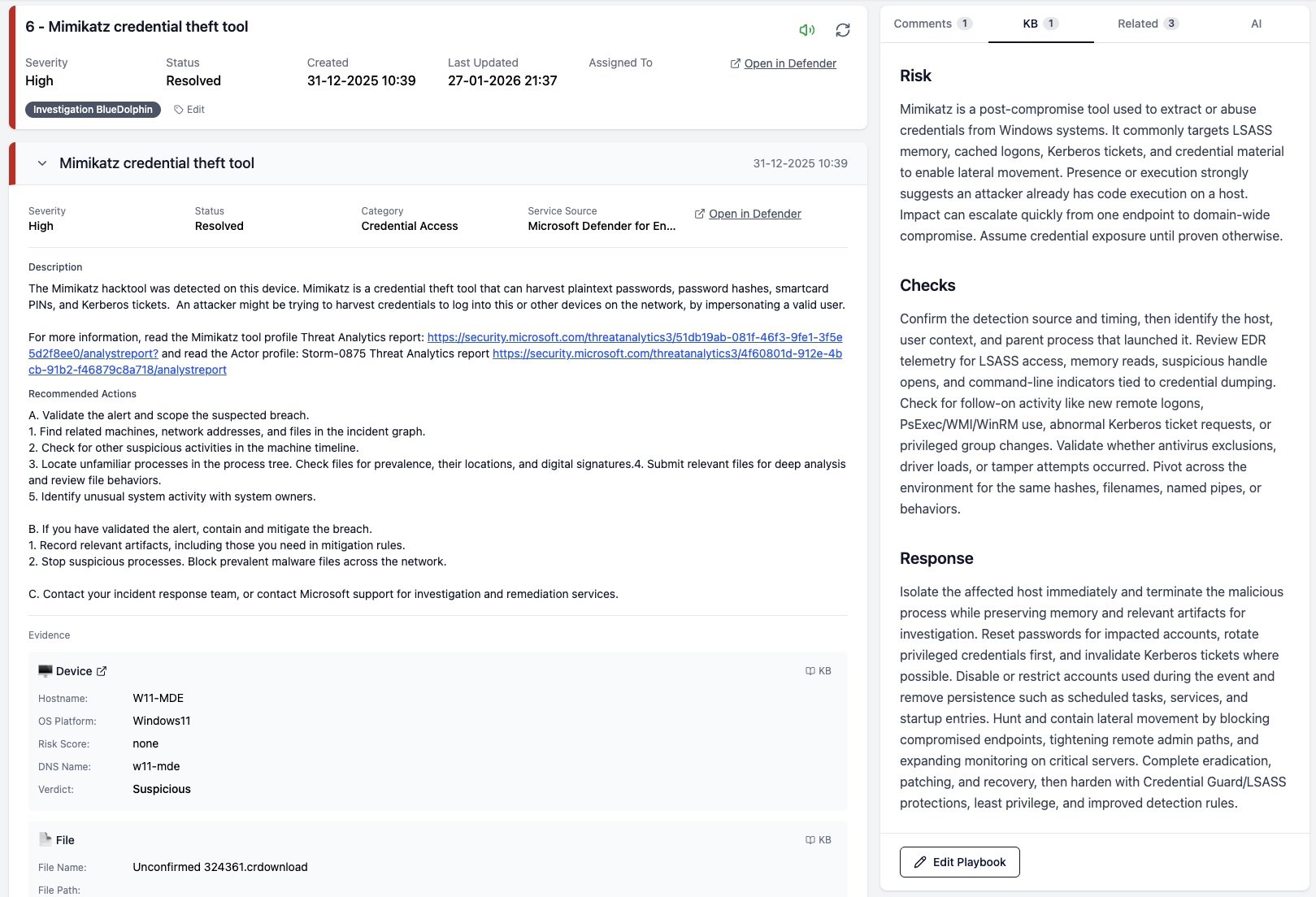
A playbook in SOC Anywhere is a Markdown-formatted response guide tied to a specific Defender alert. When an incident comes in containing that alert, the corresponding playbook surfaces automatically in the incident view. No searching through wikis, no Teams messages asking "hey, how did we handle this before?"
The idea is simple on purpose. We deliberately avoided building a complex workflow engine or automation layer. For teams without a dedicated SOC, the priority is having clear documentation in the right place at the right time. Automation can come later.
Alert-linked playbooks
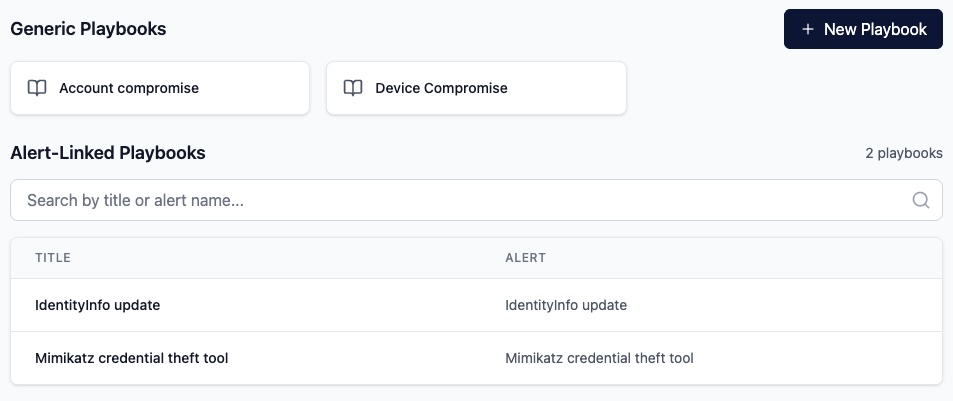
Each playbook can be linked to a specific Defender alert title. For example, you might create a playbook for "Suspicious PowerShell command line" that documents exactly how your team should investigate and respond to that type of alert. When an incident containing that alert comes in, the playbook appears right alongside the incident details in the knowledge base tab.
This is a deliberate design choice. Rather than requiring analysts to search for the right documentation, the playbook comes to them. During active incident response, reducing the number of steps between "I see an alert" and "I know what to do" matters. Especially when you are triaging from your phone, which is a common reality for smaller teams.
A typical alert-linked playbook might include:
- A brief description of what the alert means and its common causes
- Initial triage steps: what to check first
- Criteria for determining if it is a true positive or false positive
- Containment steps if action is needed
- Escalation guidelines and who to contact
Generic playbooks
Not every piece of documentation maps neatly to a single alert type. Generic playbooks serve as reference material that applies across multiple situations. Think of them as your team's internal security procedures: escalation policies, communication templates, containment strategies, or general investigation techniques.
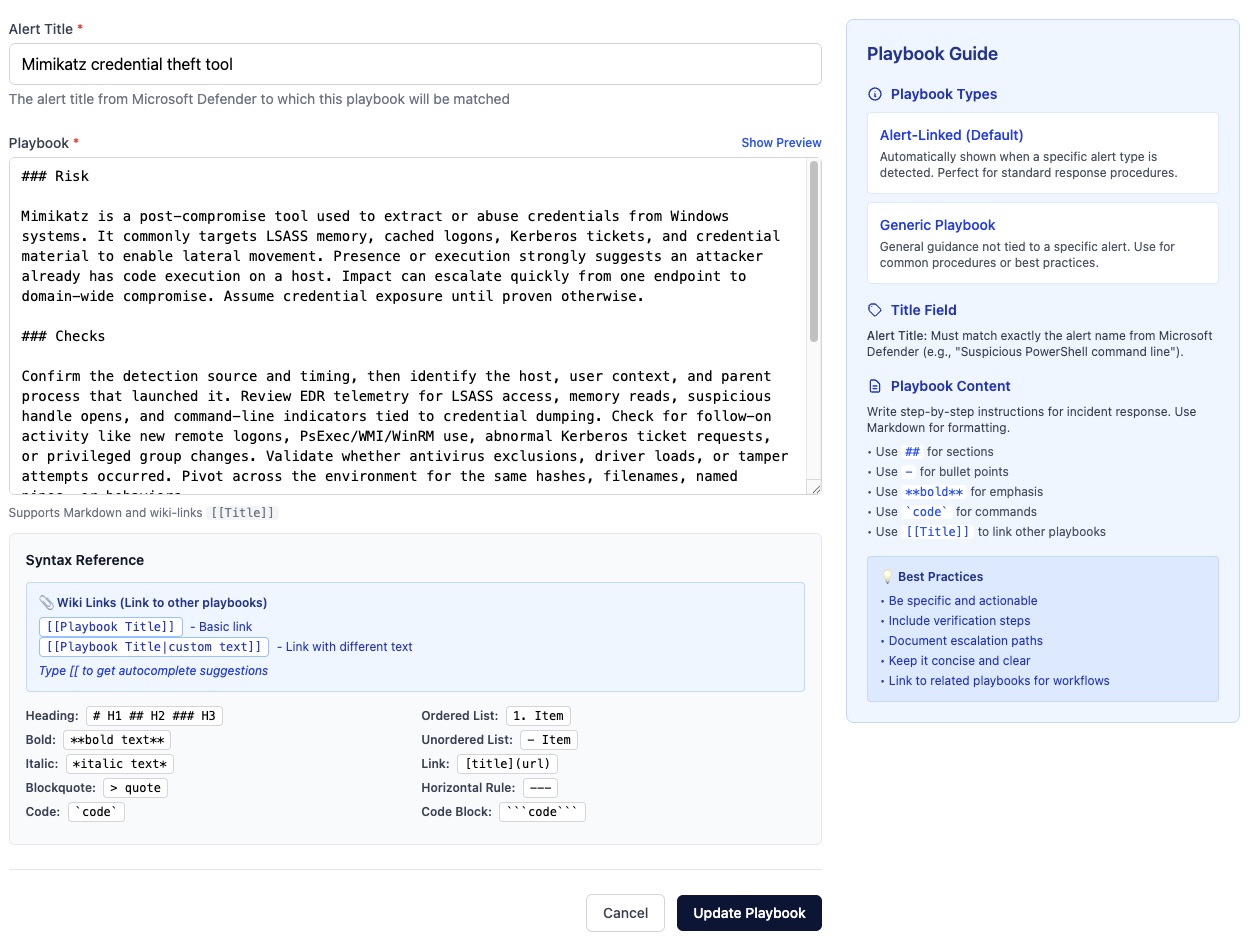
Playbooks support cross-referencing through wiki-style links. A playbook about investigating a phishing incident can link directly to your escalation procedure playbook, which can link to your communication template. This creates a connected web of documentation that analysts can navigate without leaving the incident they are working on.
When following a link from within an incident, the target playbook opens in a slide-in panel with breadcrumb navigation. You can go three levels deep and still get back to where you started. No new tabs, no lost context.
Coverage visibility
One practical concern with playbooks is knowing where the gaps are. If you have 200 detection rules and playbooks for 15 of them, finding the uncovered ones manually is tedious.
SOC Anywhere's detection rules page addresses this directly. You can filter the list to show only rules without a playbook, making it straightforward to identify and prioritize which response procedures to document next. Each detection rule page also shows whether a playbook exists, with a direct link to view or create one.
You can also create a new playbook directly from a detection rule page or from an incident, with the alert title pre-filled. This lowers the barrier to writing documentation in the moment when the context is fresh. Just finished investigating an alert for the first time? That is the best moment to write the playbook for the next person.
Why this matters for smaller teams
Larger security operations can afford specialized SOAR platforms and dedicated documentation teams. For smaller teams, the tools need to be practical and integrated into the daily workflow. Adding another tool that requires separate maintenance is rarely sustainable.
Playbooks in SOC Anywhere are designed around this constraint. They are not a separate system that needs to be kept in sync with your security tooling. They live where the work happens, surface when they are relevant, and can be authored in the same workflow where incidents are triaged.
A few scenarios where this makes a real difference:
- New team member onboarding — Playbooks give them step-by-step guidance for common alert types from day one. They do not need to shadow a senior colleague for weeks just to learn how to handle the most frequent alerts.
- Team member on holiday — The person covering does not need to call anyone to ask how to handle a specific alert. The playbook is right there.
- Recurring incidents — When the same type of alert fires again months later, the playbook from the previous investigation is immediately available. No digging through old tickets or chat histories.
- Audit and compliance — Having documented response procedures is often a requirement for compliance frameworks. Playbooks provide that documentation as a natural byproduct of the response process, not as a separate exercise.
Getting started
If you are already using SOC Anywhere, you can start creating playbooks from the playbooks page or directly from any incident or detection rule. There is no separate setup required.
A good starting point is to look at your detection rules and identify the alert types that fire most frequently. Write playbooks for those first. They do not need to be perfect or comprehensive from day one. Even a few bullet points documenting your triage process for a common alert type is significantly better than nothing.
Start with your top five alerts. For each one, write down what you would tell a colleague who has never seen that alert before. That is your first playbook. You can refine it later, add links to related procedures, and build out from there.
Over time, the goal is coverage. Not 100% on day one, but a steady increase as your team encounters and documents new alert types. The detection rules filter makes it easy to see your progress and identify the next gap to fill.
Conclusion
Responding to security incidents consistently requires documented procedures. For teams running Microsoft Defender for Endpoint without a dedicated SOC, this documentation often falls through the cracks because the tools to write and access it are disconnected from where the actual investigation happens.
Playbooks in SOC Anywhere bring that documentation directly into the incident response workflow. The playbook appears when you need it, and writing a new one is part of the natural investigation process rather than an afterthought.
It is a simple concept, but one that makes a measurable difference in how quickly and confidently a team can respond to the next alert. Particularly when that alert comes in at 7 PM and the usual person is not available.
In a follow-up post, we cover the evidence knowledge base, which tackles the complementary question: "what do we already know about this evidence?"
About the Author: we're building SOC Anywhere, a mobile-first security operations platform designed for teams without 24/7 SOCs. We've spent years working with Microsoft security tools and helping SMEs improve their security posture without enterprise budgets.
Standardize Your Incident Response
SOC Anywhere gives your team playbooks linked to Defender alert types, with mobile-optimized incident triage. No enterprise SOC required.
Try it for free — no credit card needed