 SOC Anywhere
Microsoft Defender XDR custom detection rules convert Advanced Hunting KQL queries into detections that generate alerts and can trigger automated response actions.
The challenge starts when the KQL changes.
A minor query change can reduce coverage, create false positives or change the purpose of the rule entirely. Microsoft records when a custom detection rule is edited in the audit log, but the documented audit event only indicates that the rule was modified. It does not provide a practical Git-style history of previous queries and line-by-line KQL changes.
There are several ways to address this, but most require a broader detection-as-code workflow.
Microsoft Sentinel Repositories
Microsoft now supports managing custom detection rules as code with Microsoft Sentinel Repositories.
Rules are written as Bicep files, stored in GitHub or Azure DevOps and automatically deployed after a commit. This provides branches, pull requests, approvals and Git history. Support for Defender custom detection rules is currently in preview.
This is the most Microsoft-native source-control option, but it requires more than connecting a repository.
Organizations must:
- Onboard Microsoft Sentinel workspaces to the Defender portal.
- Create rules using the Microsoft Security Bicep extension.
- Move tested queries between Advanced Hunting and Bicep templates.
- Maintain repository permissions and CI/CD workflows.
- Assign the required repository, resource group and Defender permissions.
- Make the repository the authoritative source for detections.
- Prevent or carefully manage direct portal changes.
- Validate rules after repository synchronization.
Microsoft specifically states that repository deployments overwrite changes made through the portal. The repository becomes the single source of truth.
The Authoring Experience
Source control also changes how analysts develop and tune queries.
Advanced Hunting is the natural place to write and validate KQL against live tenant data. From there, an analyst can normally create a custom detection directly from the tested query.
The repository workflow is different. The KQL must be stored in the queryText property of a Bicep template. Microsoft does not provide a built-in bidirectional workflow that automatically commits queries or portal changes back to the repository.
For teams that develop detections in Advanced Hunting, the practical workflow is therefore often:
- Write and test the query in Advanced Hunting.
- Transfer the tested KQL to the Bicep template.
- Commit the change to GitHub or Azure DevOps.
- Wait for the repository synchronization.
- Verify the deployed rule in Microsoft Defender.
Further tuning requires repeating this process.
Copying and pasting the query is not technically mandatory. Teams can author queries directly in code or build automated testing around the Microsoft Graph API. Both options, however, require analysts to move away from Defender's normal query-development experience or require additional engineering.
This split authoring and deployment workflow is less convenient than developing, testing and creating the detection entirely from Advanced Hunting.
That model works well for mature detection-engineering teams. It is less practical when analysts regularly tune rules directly in Defender.
A Custom Microsoft Graph Pipeline
Another option is to build a custom export and deployment workflow around the Microsoft Graph custom detection rule API.
The API supports listing, reading, creating, updating and deleting custom detection rules. It also exposes the KQL query through the queryCondition property. This makes it possible to export rules, store them as JSON or YAML and commit changes to Git.
A complete implementation typically requires:
- An Entra ID application and authentication flow.
- Microsoft Graph and Defender permissions.
- Scheduled rule exports.
- Consistent serialization of rule properties.
- Logic for identifying meaningful KQL changes.
- Git commits and pull-request workflows.
- Deployment, rollback and error-handling logic.
- Protection against conflicts between portal and repository changes.
Whilst the API provides the building blocks, the organization still has to build and maintain the source-control solution.
Tracking KQL Changes with SOC Anywhere
SOC Anywhere addresses the narrower operational problem.
It tracks changes to the KQL used by Microsoft Defender custom detection rules. Security teams can see how detection logic changes over time without first implementing Bicep templates, Graph automation, Terraform state or a complete CI/CD pipeline.
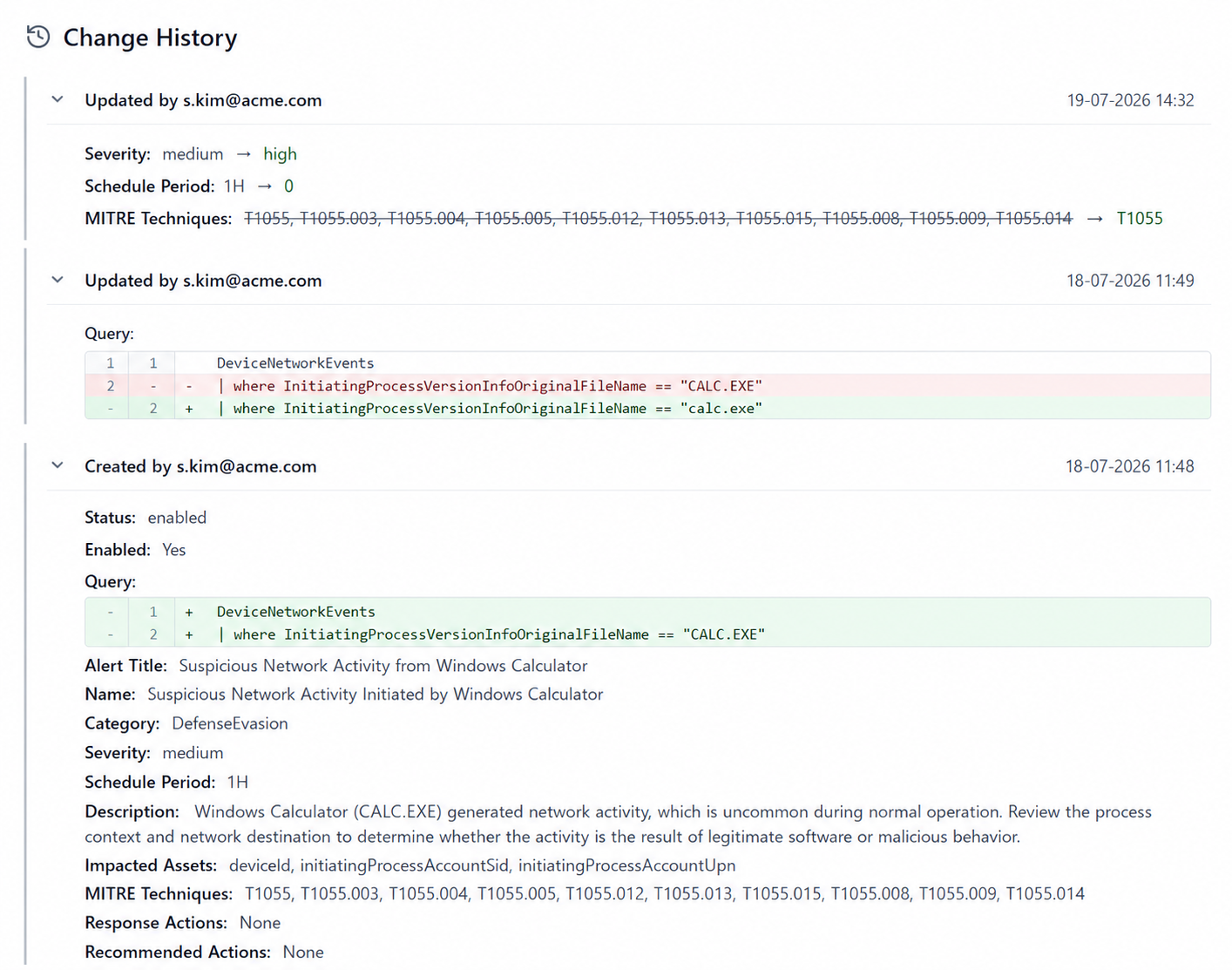
This is useful when:
- Analysts continue to tune detections in the Defender portal.
- Multiple administrators can modify rules.
- Git is not yet the authoritative source.
- The SOC needs to investigate unexpected detection behavior.
- Changes must be reviewed for audit or quality-control purposes.
- The deployed query may have drifted from the documented version.
SOC Anywhere does not attempt to replace GitHub, Azure DevOps or a mature detection-as-code process.
This allows analysts to continue developing and tuning detections through the familiar Advanced Hunting workflow while retaining visibility into subsequent KQL changes.
It provides visibility into the KQL changes that affect the detections the SOC is actually running.
Comparing the Options
| Approach | What it provides | Implementation effort |
|---|---|---|
| Microsoft Sentinel Repositories | Microsoft-native Git deployment using Bicep | High: split authoring workflow, Bicep templates, permissions, repository configuration and CI/CD |
| Microsoft Graph API | Programmatic access to detection rules | High: custom export, comparison, Git and deployment logic |
| SOC Anywhere | KQL change history for operational custom detection rules | Low: focused on change visibility rather than full CI/CD |
Which Approach Should You Use?
Use Microsoft Sentinel Repositories when every detection must be created, reviewed and deployed from Git.
Build a Graph pipeline when the organization has the engineering capacity to maintain a complete detection-as-code platform.
Use SOC Anywhere when the immediate requirement is straightforward:
Show what changed in the KQL of a Microsoft Defender custom detection rule.
A full detection-as-code workflow provides strong governance and extensive deployment control. It also introduces repositories, templates, permissions, pipelines, state management and ongoing maintenance.
Repository-first management can also make query development less convenient. Analysts often develop and validate KQL in Advanced Hunting, then transfer the query to source control, commit it, deploy it and verify the result in Defender.
For teams that require pull requests, approval gates and controlled deployments, this additional process can be justified.
For teams whose immediate requirement is visibility into operational KQL changes, SOC Anywhere provides that history without requiring analysts to redesign how they develop and tune custom detections.
About the Author: we're building SOC Anywhere, a mobile-first security operations platform designed for teams without 24/7 SOCs. We've spent years working with Microsoft security tools and helping SMEs improve their security posture without enterprise budgets.
Track how Defender detection logic changes over time
SOC Anywhere helps security teams monitor KQL changes in Microsoft Defender custom detection rules, so you can review drift, investigate tuning decisions and keep detection quality visible.
Try it for free — no credit card needed